Size Recommender for Shopify
By Mohit Patel, Marketing Specialist, Tailor Size Guide
A size recommender answers the question every shopper asks on a clothing product page: "Which size should I get?" Instead of handing them a table and a tape measure, Tailor Size Guide asks a few quick questions, such as height, weight, the size they usually wear, and how they like things to fit, and then recommends one size for that specific product.
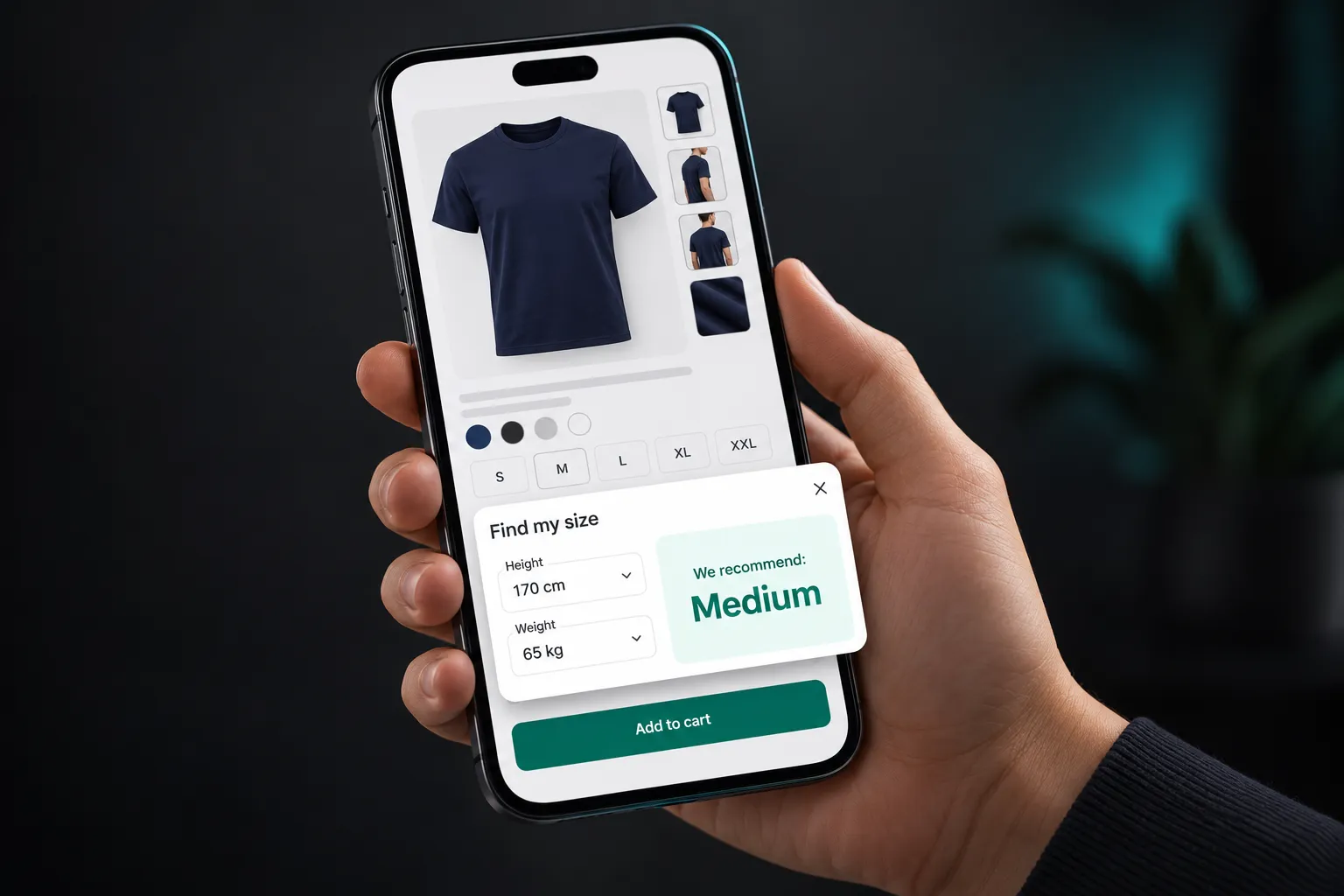
It's built into the same Shopify app as our size charts and made-to-order measurement forms. It installs without theme code, sits next to your size selector as a "Find my size" button, and works from the real measurements of each garment you sell. Below, I'll explain how it works, what shoppers see, what you need to set it up, and how to tell whether it's working in your store.
Free plan available · No theme code · Works on Online Store 2.0 themes
Why shoppers need more than a size chart
A size chart is essential, and you should keep one on every product. But it asks a lot of the shopper. They need a tape measure, they need to know where to measure, they need to work out whether the chart shows body or garment measurements, and then they need to decide what to do when they fall between two sizes. Plenty of people don't do any of that. They guess.
Guessing is expensive. The National Retail Federation estimates that 19.3% of online sales were returned in 2025, against 15.8% for retail overall, and in clothing and shoes, size and fit are consistently among the top reasons. Some shoppers protect themselves by ordering two sizes and sending one back, which our guide on reducing bracketing covers. Others simply leave without buying.
A size recommender takes the guesswork away. It turns a decision the shopper finds hard into a short set of questions they can answer from memory, and gives them one clear answer. Our deeper look at whether fit recommenders reduce returns goes through where the gains come from and where they don't.
How the Tailor Size Guide size recommender works
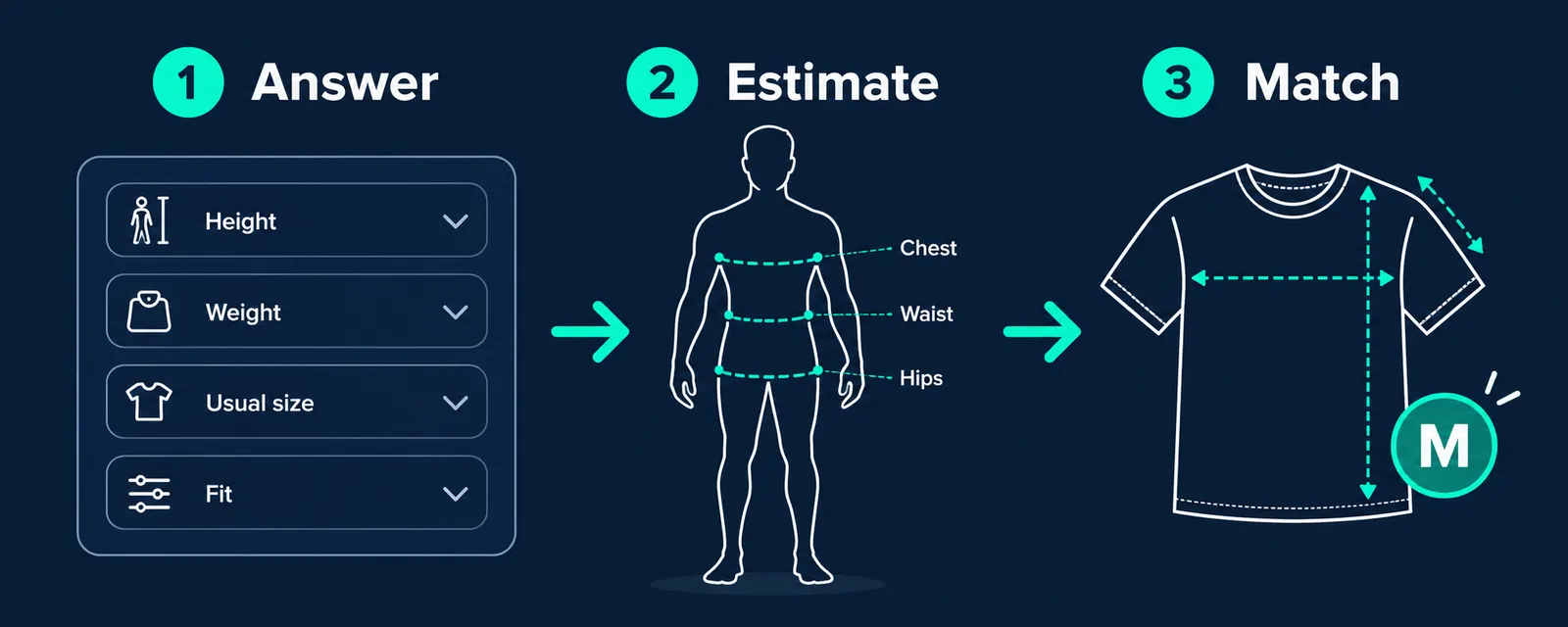
There are three parts to every recommendation.
1. The shopper answers a few questions
When a shopper taps Find my size, they're asked a short set of questions. You choose which ones to use. The usual set is:
| Question | Why it helps |
|---|---|
| Height | Sets the length dimensions: torso, sleeve, inseam |
| Weight | Combined with height, gives a good estimate of body width |
| Usual size in a brand they know | Calibrates the estimate to how they're actually built and what they're used to wearing |
| Fit preference (closer, regular, looser) | Decides how much ease, or room, they want in the garment |
Three or four questions is the sweet spot. Each extra question makes the estimate a little better, but also makes some shoppers give up before the end. Our article on the best fit recommender quiz questions looks at which inputs add the most accuracy for the effort.
2. The answers become a body estimate
From those answers, the recommender estimates the measurements that matter for the product: chest, waist and hips for most clothing, plus length measurements. It doesn't need the shopper to measure anything. The "usual size" answer is particularly useful here, because it anchors the estimate to a size the shopper already knows fits them.
3. The estimate is matched against the actual garment
This is the part that makes it more than a generic S/M/L guess. Each product in your store has its own measurements: a slim shirt and a relaxed shirt can have very different chests in the same size. The recommender compares the shopper's estimated body with that product's measurements, adds the amount of room their fit preference calls for, and picks the size that fits best. So the same shopper can get a Medium in one product and a Large in another, which is exactly how real clothes work.
Our explainer on how an AI size recommender predicts the right size goes deeper into the logic.
It gets better with feedback
After an order is delivered, you can collect simple fit feedback: did it run small, true to size, or large? That feedback helps tune recommendations over time, so a product that consistently runs small gets recommended a size up. It's also useful for you as a merchant, because it shows which products have a sizing problem in the first place. See how to collect fit feedback after purchase for ways to gather it.
What shoppers see
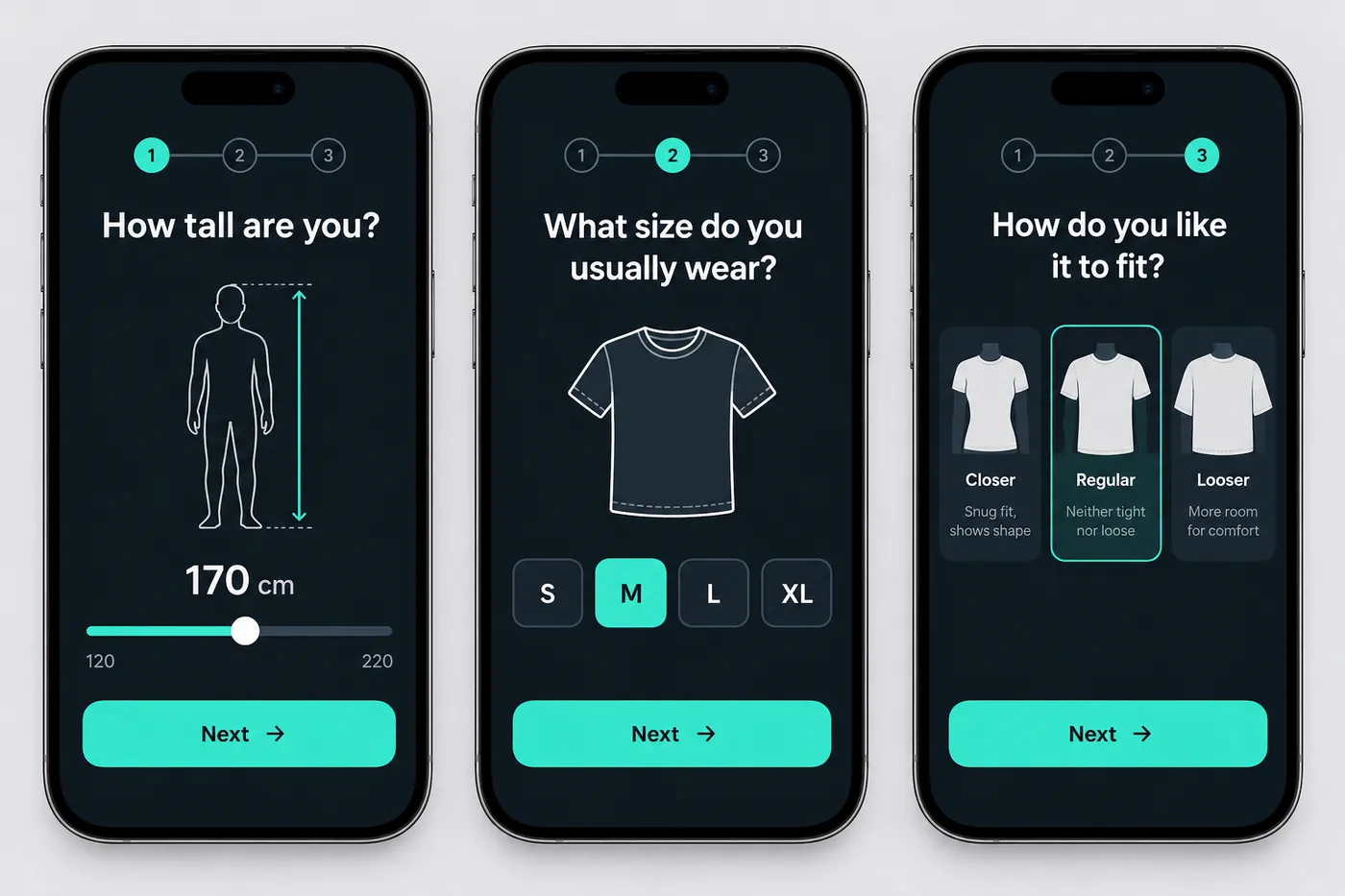
On the product page, a Find my size button sits next to the size selector. Tapping it opens a short, mobile-friendly panel with the questions, one screen at a time. At the end, the shopper sees a clear answer, for example:
They can then pick that size and add to cart, or open the size chart to check the numbers themselves. Some shoppers always want to see the table, and that's fine. The recommender and the chart work together: the chart builds trust, and the recommender makes the decision easy.
Size recommender vs size chart
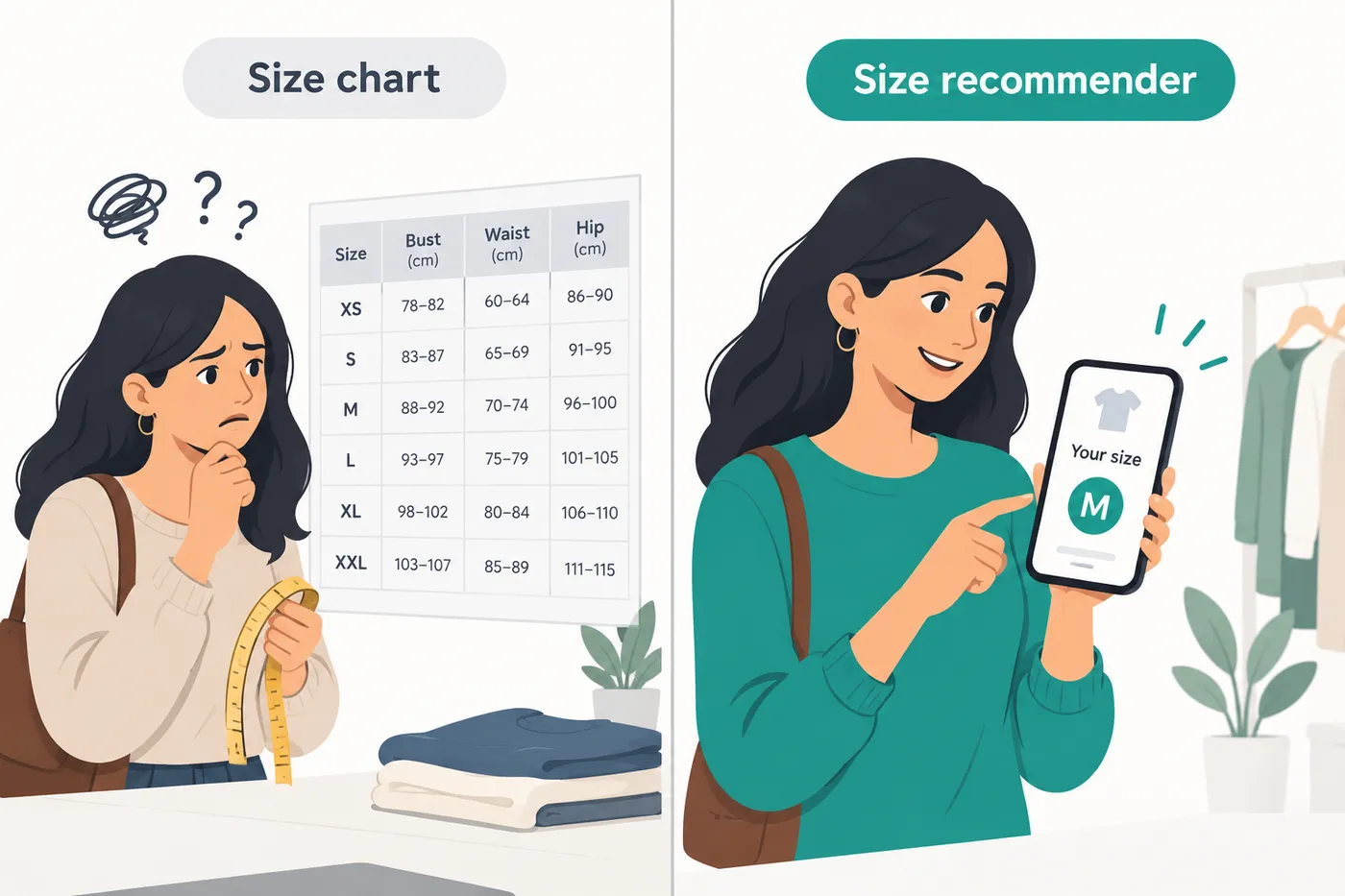
They do different jobs, and the best product pages have both.
| Size chart | Size recommender | |
|---|---|---|
| What the shopper does | Measures themselves and reads a table | Answers 3 or 4 quick questions |
| What they get | Numbers to interpret | One recommended size |
| Needs a tape measure | Usually | No |
| Helps gift buyers and first-time customers | A little | A lot |
| Accounts for each product's cut | Only if the chart is product-specific | Yes, by design |
| Improves over time | No | Yes, with fit feedback |
For a fuller comparison, read size recommender vs size chart, and for the other main alternative, fit recommender vs virtual try-on.
Who it's for
The recommender is most useful wherever there's real variation between products or between brands:
- Fashion and apparel stores with slim, regular and relaxed cuts. See fit recommenders for dresses and for menswear.
- Denim brands, where waist, rise and inseam all matter. See fit recommenders for jeans.
- Activewear, where compression and stretch change the fit. See fit recommenders for activewear.
- Plus-size brands, where sizing varies widely between labels. See fit recommenders for plus size.
- Kids' clothing, where parents buy for a child who isn't there to measure. See fit recommenders for kids' clothing.
- Swimwear, lingerie and footwear, which have their own sizing rules. See the guides for swimwear and lingerie and footwear.
If you sell made-to-measure or tailored garments, the same app also collects exact customer measurements at checkout. See made-to-order on Shopify.
What you need before you switch it on
The recommender is only as accurate as the product data behind it. Before launch, make sure you have:
- Garment measurements for each product or product type. At minimum chest, waist and length for tops, and waist, hip and inseam for bottoms. If several products share a pattern, you can enter it once and assign it to all of them.
- The measurements your factory actually uses, not a generic chart copied from elsewhere. If your mediums run small, the data should say so.
- A sense of each product's intended fit. Is it meant to be slim, regular or oversized? That tells the recommender how much room to aim for.
If your size charts are already accurate, most of this is done. If they're not, it's worth fixing them first; our guide to auditing your existing size charts walks through it.
How to set it up on Shopify
Setup takes a few minutes on any Online Store 2.0 theme and needs no code.
- Install Tailor Size Guide from the Shopify App Store.
- Add your garment measurements for each product or group of products.
- Choose your questions. Start with height, weight, usual size and fit preference.
- Add the Find my size button. In the theme editor, open your product template, add the Tailor Size Guide app block next to the variant picker, and save.
- Preview on mobile, answer the questions as a shopper would, and check the recommendation makes sense for a few products.
- Publish.
Our step-by-step guides on adding a size recommender to Shopify and setting up size recommendations with no code have screenshots, and the documentation covers every setting.
Where to place it
The right place is directly next to the size selector, because that's the moment shoppers are deciding. A few placement tips that hold across stores:
- Label it plainly: Find my size or What's my size?
- Keep the size chart link next to it, so shoppers who prefer numbers can still check.
- Make sure it's visible on mobile without scrolling past the add-to-cart button.
- Don't hide it in a tab further down the page.
Our guide on showing a size recommender on product pages compares placements in more detail.
How to measure whether it's working
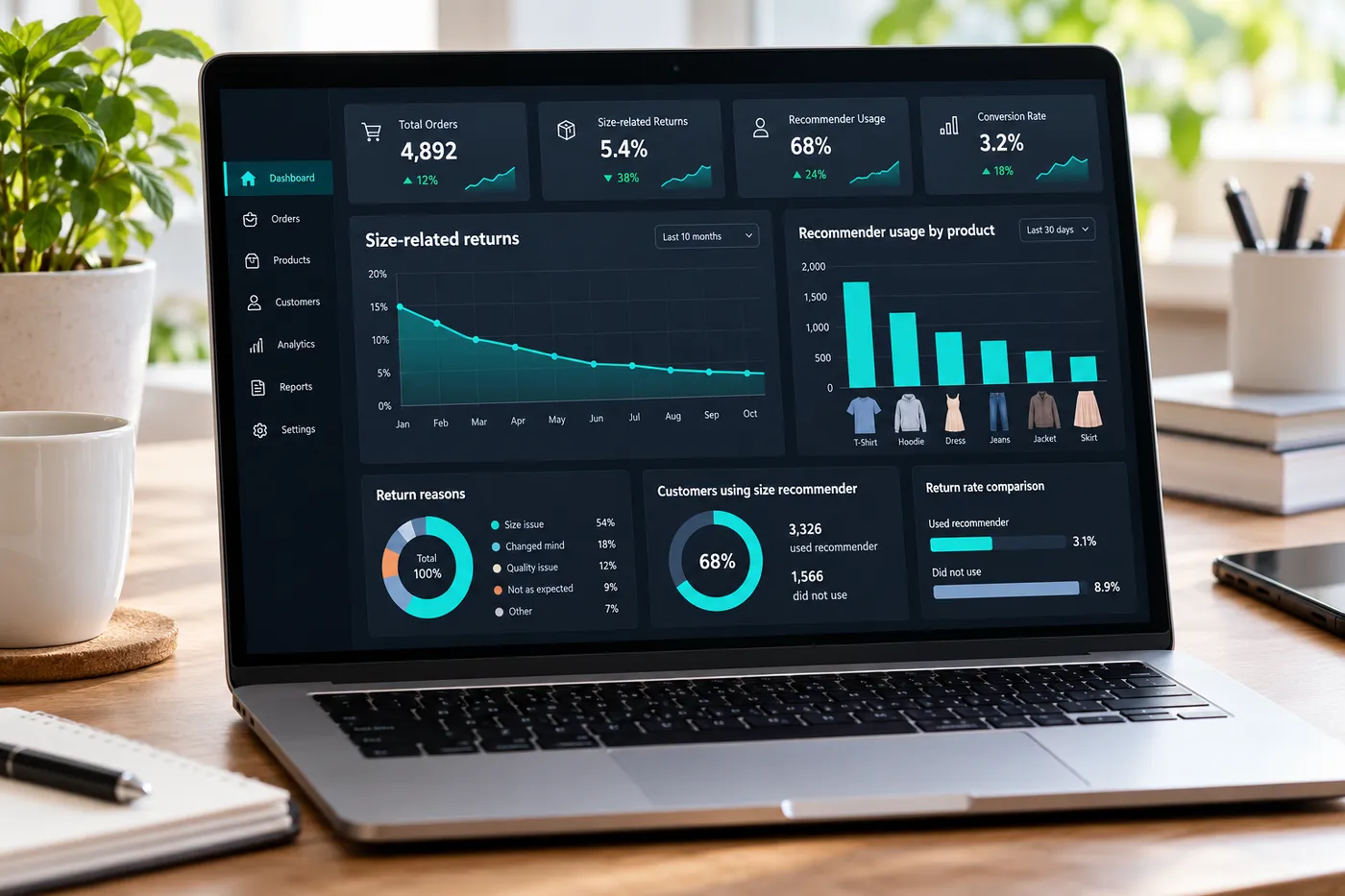
Don't take the recommender's value on trust. Measure it. Compare the 60 to 90 days before launch with the 60 to 90 days after, and look at:
| Metric | What to look for |
|---|---|
| Return rate for "too small" / "too large" | Should fall. This is the main signal. |
| Exchanges for a different size | Should fall too. |
| Recommender usage | What share of shoppers on a product open it. Low usage usually means poor placement. |
| Conversion rate on products with the recommender | Watch for a lift as size doubt goes down. |
| Orders with two sizes of the same item | Should fall as bracketing drops. |
Look at return reasons by product, not just overall. A recommender won't fix a product whose measurements are wrong; it'll just recommend the wrong size with confidence. Products that still come back for size after launch are the ones whose data needs checking. Our guide on measuring the ROI of a size guide app has a fuller framework, and the returns cost calculator helps put a money value on the change.
Privacy
Shoppers share a few personal details, such as height and weight, to get a recommendation, so it matters how that's handled. The recommender only asks for what it needs to suggest a size, and you choose which questions to use. Our privacy policy explains what data the app collects and how it's used, and our article on size chart GDPR compliance covers what merchants should tell their own customers.
Pricing
The size recommender is available on every plan, including Free, with unlimited recommendation requests. The free plan also includes up to two size charts and one custom measurement form. Paid plans start at $7.99 a month (Starter) and raise the limits on size charts, measurement forms and AI features: Professional is $13.99 and Advanced is $24.99, with about 20% off on yearly billing. Current plans and prices are on the pricing section of the homepage and the Shopify App Store listing.
Frequently asked questions
What is a size recommender?
A tool on a product page that asks shoppers a few quick questions, such as height, weight, usual size and fit preference, and recommends the size of that product most likely to fit them, instead of making them read a size chart.
How does the Tailor Size Guide size recommender choose a size?
It estimates the shopper's body measurements from their answers, calibrates to the size they usually wear, then compares that with the actual measurements of the product they're viewing and the fit they prefer. It recommends one size for that product.
Do shoppers need a tape measure?
No. The questions can all be answered from memory. Shoppers who want to check the numbers can still open the size chart next to the recommender.
Does a size recommender reduce returns?
It targets wrong-size returns, which are among the most common returns in clothing and footwear. It works best when your product measurements are accurate. Measure the change by comparing size-related return rates before and after launch.
Do I need to code anything to add it to Shopify?
No. On Online Store 2.0 themes you add the Tailor Size Guide app block next to the size selector in the theme editor.
Is the size recommender free?
Yes. The size recommender is included on the free plan with unlimited recommendation requests. Paid plans, from $7.99 a month, add more size charts, measurement forms and AI features.
Can I use the size recommender and a size chart together?
Yes, and you should. The chart lets shoppers check the numbers, and the recommender gives them a single answer. Both come from the same product measurements in the app.
Source for the return-rate figure: National Retail Federation, 2025 Retail Returns Landscape.
Give every shopper one clear size
Size charts, a size recommender and made-to-order measurements in one Shopify app. Start on the free plan.
Install on Shopify